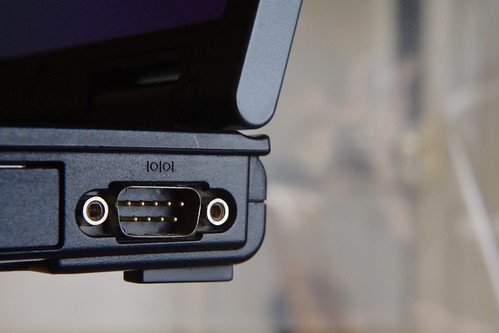
For this post, we're going to send some characters out the serial port, which is then looped back, so we can read what we sent, and we're going to do it just using command line tools.
To do this, we're going to have to do a little hardware. It's very minor, though. What you'll need is a connector that plugs into your serial port. On that connector, join pins 2 & 3 together, which are the send and receive pins. This is the case for both D9 and D25 connectors. Most connectors have each pin numbered.
If you're handy with a soldering iron, a connector with solder buckets can be used. These are easily linked with a blob of solder, or a short piece of wire. Make sure that no solder spikes touch any other pins, though.
If soldering seems a bit daunting, then connectors that accept crimp connectors can be used.
With the hardware sorted out, let's look at the software.
If you need to set the permissions to use your serial port, then this was covered in a previous post, here.
____________________
Sunday, 10 April 2011
Saturday, 26 February 2011
Permissions
Now the serial port has been found, are we allowed to use it?
If you get this when logged in as a normal user:
$setserial /dev/ttyS0
/dev/ttyS0: Permission denied
You do not have permission to access the serial port.
____________________
Monday, 21 February 2011
Find your serial port
First we need to track down our serial port, in both a hardware and software sense.
____________________
Saturday, 5 February 2011
Serial Lines begins
This is a blog about serial comms on Gnu/Linux. So, who am I to write a blog about this? Am I an expert? Not at all. It's more my journey of learning about programming serial programs on Linux.
My background is as a systems engineer since the mid eighties, on embedded systems, but on bare code, no operating system, so this Linux thing is all a bit new to me. Like most engineers, I've worked on a variety of projects, so my experience tends to jump all over the place. In some areas, I've done lots, and others I've never touched.
As well as programming on Linux, I'll be looking at hardware, fault finding and probably touch on other Unixes, besides Linux.
I'm based in the UK, so my spelling will be British English, so, you'll see things like colour, rather than color.
Why start a blog on serial comms now, isn't serial dead? Well, it might be on desktop PCs, but in industry it's still used for all sorts of things. Barcode readers, comms devices, printers. UPSs, diagnostic terminals. Have a look at the average industrial or embedded PC, and it's quite often bristling with serial ports. Can't these devices use USB or a network connection? Maybe, but sometimes serial is a better design decision. It can be simpler, robuster, or maybe just easier to fault find.
So, here we go into the wonderful world of serial comms on Linux.
My background is as a systems engineer since the mid eighties, on embedded systems, but on bare code, no operating system, so this Linux thing is all a bit new to me. Like most engineers, I've worked on a variety of projects, so my experience tends to jump all over the place. In some areas, I've done lots, and others I've never touched.
As well as programming on Linux, I'll be looking at hardware, fault finding and probably touch on other Unixes, besides Linux.
I'm based in the UK, so my spelling will be British English, so, you'll see things like colour, rather than color.
Why start a blog on serial comms now, isn't serial dead? Well, it might be on desktop PCs, but in industry it's still used for all sorts of things. Barcode readers, comms devices, printers. UPSs, diagnostic terminals. Have a look at the average industrial or embedded PC, and it's quite often bristling with serial ports. Can't these devices use USB or a network connection? Maybe, but sometimes serial is a better design decision. It can be simpler, robuster, or maybe just easier to fault find.
So, here we go into the wonderful world of serial comms on Linux.
Subscribe to:
Posts (Atom)